Teyvat PaletteTeyvat colour cards
Scene library
GitHub
Gallery
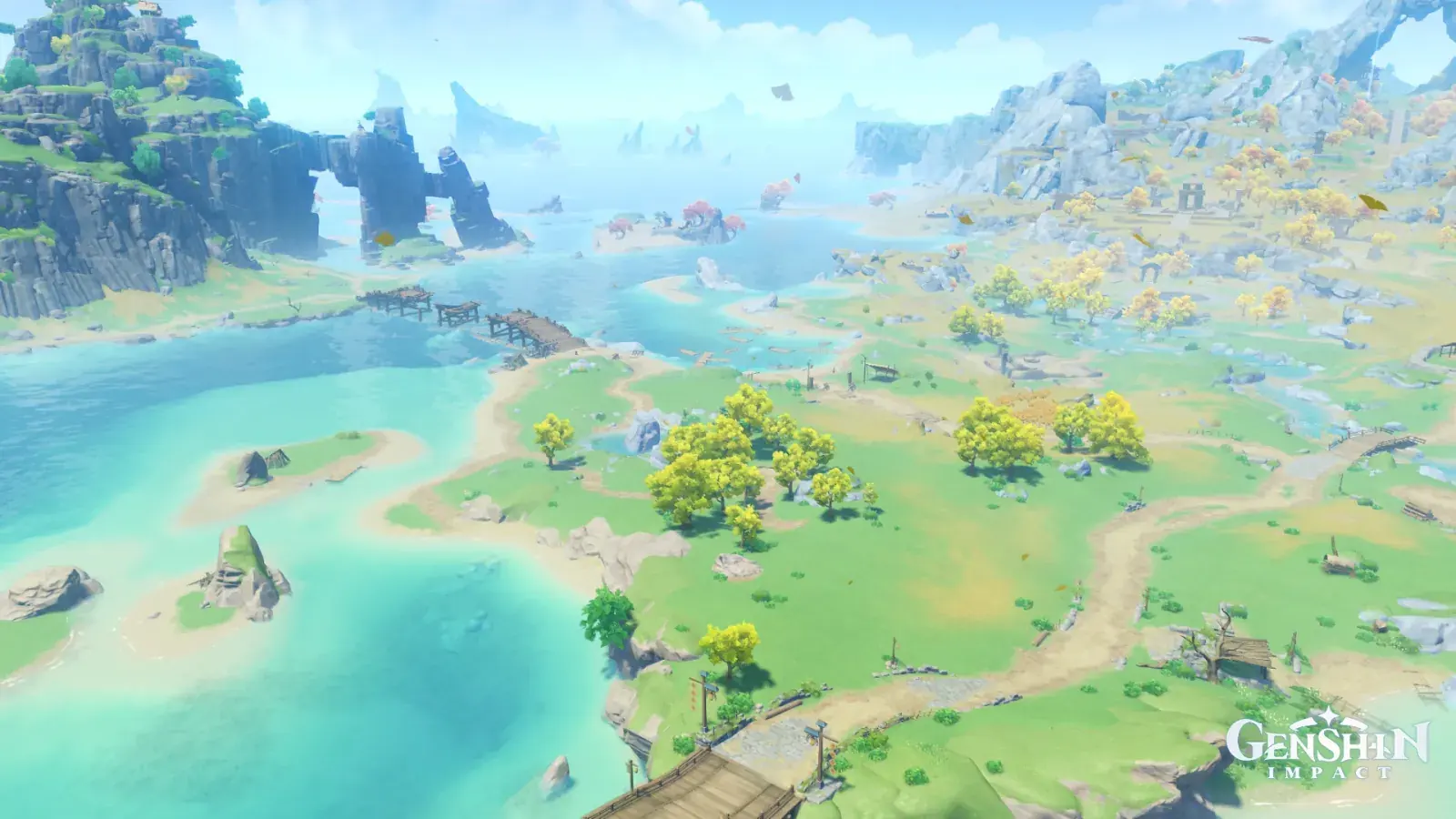
Qiongji Estuary at Noon
LiyueDayClearBuoyantFertile

Qiongji Estuary at Noon

Palette

Click a swatch to copy its HEX; hover for the OKLCH value.

Reconstructed gradient

The gradient distilled from the scene, unrolled left to right by stop; the authored angle is 200° (used by the hero and exports), while gallery cards share a uniform 135° sweep.

0%bdeefc34%a1ddc772%9ec27e100%5d91a8

Why it works

In a high-key picture, "black" is relative: that cliff on the left, which reads as black, measures L 0.63 — only 0.20 below the frame's median of 0.83, and even the darkest 1% still reaches 0.52. To hold a bright picture down you do not need black, you need one surface 0.2 below its neighbours.

01

The darkest one percent stops at 0.52

Lightness runs p01 0.52 / p50 0.83 / p99 0.97: this picture has no shadows at all, it lives entirely in the top quarter of the lightness axis. The basalt cliff in the upper left reads as "black" in context, yet samples at L 0.63, chroma 0.065, hue 227° — lighter than mid grey. It works because the frame of reference is this picture itself: the eye judges dark and light by the difference from its neighbourhood, not by an absolute. Turn the Desert of Hadramaveth study over and you get this one: there too lightness decides the climate, but there it compares the medians of two deserts, and here it compares the drop inside a single frame.

02

Three near-equal areas, divided by hue

Green 37.5%, cyan 26.0%, blue 28.8% — meadow, estuary and sky split the frame with no majority anywhere. Their lightnesses run 0.81 / 0.84 / 0.79, effectively one step; what actually separates them is hue at 131° / 188° / 230°, roughly 55° per jump. When neither area nor lightness decides, hue has to speak clearly — and 55° is the distance at which two adjacent fields read as distinct without fighting.

03

The most saturated thing is also among the brightest

The chroma peak is not in shadow: the most saturated four thousand pixels average L 0.87, chroma 0.159, hue 114°, at (0.56, 0.58) — the clumps of yellow-leaved trees out on the meadow. Even the most saturated 3% of that region only reaches chroma 0.114. So this picture's highlight, lead and accent are all crowded into L 0.77–0.92, and its only structural contrast comes from that one cliff at 0.63. A whole set of colours can live inside a narrow lightness band, provided you are willing to spare one surface as the anchor.

Take these colours with you

CSS variables, a Tailwind v4 theme or SVG — one click to copy into your project.

/* Qiongji Estuary at Noon · Qiongji Estuary at Noon — Teyvat Palette */
:root {
  --cliff-slate: oklch(0.63 0.065 227); /* Cliff Slate #5d91a8 */
  --shoal-teal: oklch(0.85 0.068 170); /* Shoal Teal #a1ddc7 */
  --meadow-green: oklch(0.77 0.099 131); /* Meadow Green #9ec27e */
  --canopy-gold: oklch(0.86 0.114 109); /* Canopy Gold #d7d77c */
  --sky-wash: oklch(0.92 0.054 217); /* Sky Wash #bdeefc */
  --gradient-qiongji-estuary: linear-gradient(200deg, oklch(0.92 0.054 217) 0%, oklch(0.85 0.068 170) 34%, oklch(0.77 0.099 131) 72%, oklch(0.63 0.065 227) 100%);
}

A 1080×1350 PNG carrying the scene, its palette and every value — save it and post it as is.