Teyvat PaletteTeyvat colour cards
Scene library
GitHub
Gallery
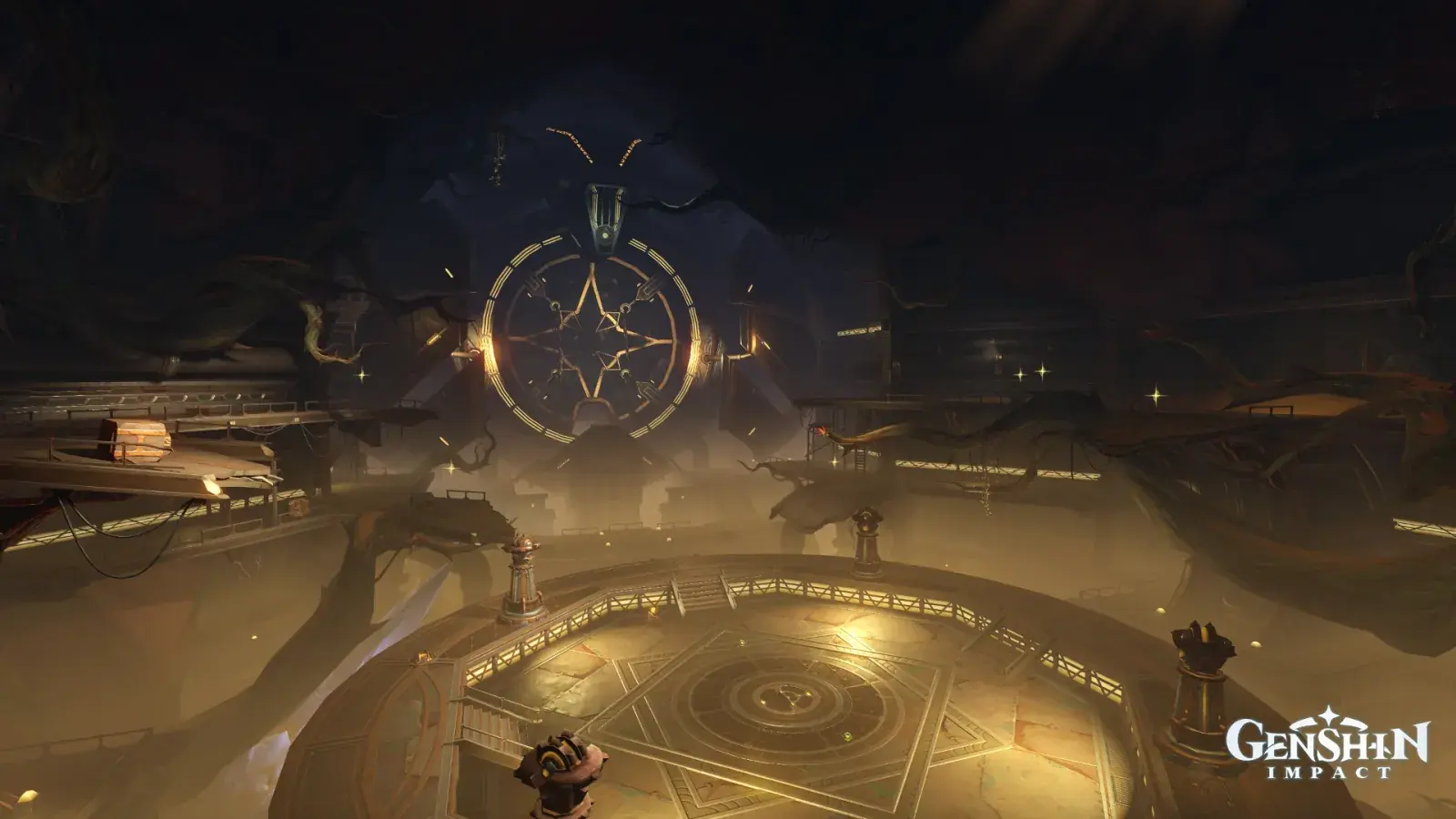
Madinat al-Nuhas in Golden Dust
SumeruCavernousWarm DustClockwork

Madinat al-Nuhas in Golden Dust

Palette

Click a swatch to copy its HEX; hover for the OKLCH value.

Reconstructed gradient

The gradient distilled from the scene, unrolled left to right by stop; the authored angle is 180° (used by the hero and exports), while gallery cards share a uniform 135° sweep.

0%0f0e1420%1d1e2c42%e5b65f62%57432c100%987743

Why it works

The gap between top and bottom can be charged to all three channels at once — but that amounts to declaring that top and bottom no longer belong to the same light. Measure Madinat al-Nuhas's upper and lower edge with the same pair of rectangles: lightness 0.20 against 0.53, chroma 0.015 against 0.075, hue 274° against 76°. All three axes are pushed to the stop, and what it buys is not "a cleaner separation" — it is swapping the sky for a lid. The 10%-tall band of rock along the very top of the frame holds 92,160 pixels and not one of them crosses the achromatic line; its highest chroma is 0.024. The whole cool half of the wheel, 150°–330°, has 1,448 pixels left in the entire picture. Its batch-mate «Treasures Street under a Seam of Sky» separates top from bottom on hue alone (the two ends measure chroma 0.052 against 0.060). That one has a sky; this one does not — spending all three channels does not buy a stronger separation, it buys "there is no way out of here".

01

The cold is lightness in disguise

The whole cool half of the wheel, 150°–330°, holds just 1,448 pixels across the frame, averaging chroma 0.026 with a maximum of 0.052 — barely standing on the achromatic threshold of 0.025 — and yet it reads as an entire vault of dim blue. The 10%-tall band of rock along the top edge, 92,160 pixels, tops out at chroma 0.024: not one pixel crosses the line. The warm half, by contrast, is entirely real: 15°–105° carries 404,297 pixels averaging L 0.47 / chroma 0.060 / hue 71°. This is exactly what charging all three channels costs — once the hue account has been spent 162°, the ceiling has no hue left to use and can only speak in low lightness, and the viewer supplies "cold" on its behalf. To paint a cold shadow, first try giving it no hue at all; the large warm field beside it will do the cooling for you.

02

The light is not on the objects, it is in the air

Very few solid things in this cavern city are actually lit: the hexagonal terrace at the bottom edge measures L 0.59 / chroma 0.081 / hue 77°, and its most chromatic 3% reaches L 0.84 / 0.119 / 88°. Above it, two patches of dust haze made of nothing at all measure L 0.42 / 0.049 / 68° and L 0.36 / 0.040 / 71° — while the frame's median chroma is only 0.020, so the haze is more than twice it, and the yellow band alone eats 44.77% of the picture. «Desert of Hadramaveth, Sandstorm» said that half the colour of an environment is the colour of its air; this frame is more extreme still. Not one solid object carries the 162° of hue between top and bottom. What carries it is haze at 0.045 and a rock ceiling with almost no hue at 0.012. To make a space read as though light were moving through it, do not hand all the chroma to the lamp; hand it to the air between the lamp and the eye.

03

Spending all three buys "no sky"

Put the same pair of rectangles on the other three pictures in this batch: Shapur Hotel measures lightness 0.33 at both ends and differs only in chroma, 0.076 against 0.024. Treasures Street measures chroma 0.052 against 0.060 and differs only in hue, 159° against 233°. Wikala Funduq's two ends share a hue family, 158° against 123°, and differ only in lightness, 0.34 against 0.87. All three separate, and separate cleanly. Madinat al-Nuhas spends all three at once, and what it gains is not a stronger split — its 0.33 of lightness does not even reach Wikala's 0.53 — but a change of meaning: the surface above is no longer read as a sky, it is read as a lid. Use it in reverse. To make a space feel like it has a way out, separate ground from ceiling on one axis only; to seal it, push all three to the stop.

Take these colours with you

CSS variables, a Tailwind v4 theme or SVG — one click to copy into your project.

/* Madinat al-Nuhas in Golden Dust · Madinat al-Nuhas in Golden Dust — Teyvat Palette */
:root {
  --rock-lid-violet: oklch(0.17 0.012 293); /* Rock-Lid Violet #0f0e14 */
  --remote-violet: oklch(0.24 0.026 280); /* Remote Violet #1d1e2c */
  --clockwork-gold: oklch(0.8 0.118 81); /* Clockwork Gold #e5b65f */
  --dust-haze-gold: oklch(0.4 0.045 70); /* Dust-Haze Gold #57432c */
  --lamplit-terrace: oklch(0.59 0.081 77); /* Lamplit Terrace #987743 */
  --gradient-madinat-al-nuhas: linear-gradient(180deg, oklch(0.17 0.012 293) 0%, oklch(0.24 0.026 280) 20%, oklch(0.8 0.118 81) 42%, oklch(0.4 0.045 70) 62%, oklch(0.59 0.081 77) 100%);
}

A 1080×1350 PNG carrying the scene, its palette and every value — save it and post it as is.