Teyvat PaletteTeyvat colour cards
Scene library
GitHub
Gallery
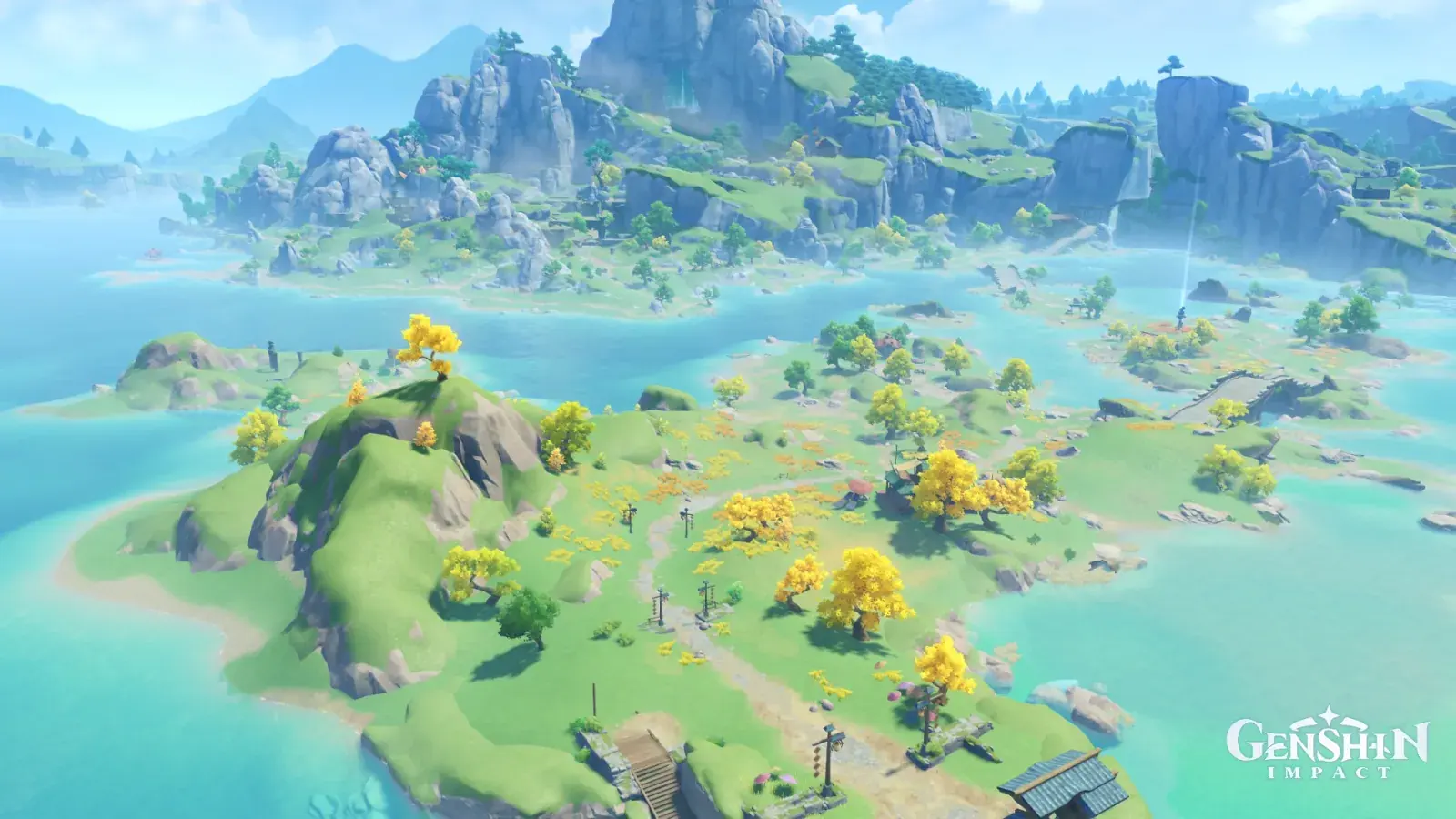
Bishui Plain, Sunlit Shallows
LiyueDayLimpidOpenSerene

Bishui Plain, Sunlit Shallows

Palette

Click a swatch to copy its HEX; hover for the OKLCH value.

Reconstructed gradient

The gradient distilled from the scene, unrolled left to right by stop; the authored angle is 180° (used by the hero and exports), while gallery cards share a uniform 135° sweep.

0%95c9ea12%baf4fd28%5b9bbc50%b1d9c572%8cc27d100%f4eb4f

Why it works

Shallow water has no hue of its own. It is a slider strung between the seabed and the sky, and depth decides where the slider stops: the same jade water reads 164° at the shore, 200° out in the bay, 227° in the furthest channel — and the sky is 237°. Across that whole 63° journey, chroma only wanders between 0.050 and 0.099. Do not pick a single "water blue"; fix the two ends first, then take a value between them according to depth.

01

That jade band at the shore is sand, not water

The shallows clinging to the island's rim measure hue 164°, lightness 0.85, chroma 0.050; the sky measures 237° at lightness 0.81 — 73° apart, and the shallows are the brighter of the two. If the water were a mirror it would carry the sky's hue and sit darker than it. It does neither, because through a thin layer of water what you see is the bottom. Sample the left-hand bay in four steps from the shore outward, roughly eleven hundred pixels each, and the hue turns 182° → 188° → 194° → 200°, monotonically toward the sky; on the right it turns 163° to 190°. The contours of the water's colour are the contours of its depth, so it traces every island's coastline a second time — look only at the water, never at the land, and you can still read the shape of this archipelago.

02

All 63° are charged to the hue account

From 164° at the shore to 227° in the furthest channel the water travels 63°, yet its chroma stays inside 0.050–0.099 the whole way: 0.050 at the shallowest, 0.097 in the bay, 0.069 at the furthest, against a whole-frame chroma median of just 0.074. Thickness here changes which colour it is, not how much colour there is. Thalatta Submarine Canyon is the same medium seen from inside: there the chroma median is 0.119, and the water's own chroma falls with depth from 0.122 to 0.087. Look at something through a medium and thickness moves lightness and chroma; look at the medium itself and thickness moves hue.

03

Not even the beach is allowed to be warm

Run a 15°–60° search across the whole frame and the most chromatic 3% comes to 9 pixels at chroma 0.073; the orange band holds 0.03% and the red band 0.01%. Even the pale ring of sand around each island measures L 0.78, chroma 0.069, hue 169° — it has already gone over to the water's side. The one thing that crosses the line is the yellow tree crowns inland: the most chromatic 3% within 90°–120° reads L 0.92, chroma 0.170, hue 106°, half again as chromatic as the most vivid grass at 0.112. If a water-led picture needs a focal point, do not look for it in the water — put the land and the sky on the same slider, then let one thing stand off it.

Take these colours with you

CSS variables, a Tailwind v4 theme or SVG — one click to copy into your project.

/* Bishui Plain, Sunlit Shallows · Bishui Plain, Sunlit Shallows — Teyvat Palette */
:root {
  --sky-blue: oklch(0.81 0.072 237); /* Sky Blue #95c9ea */
  --haze-pale: oklch(0.93 0.059 208); /* Haze Pale #baf4fd */
  --grey-cliff: oklch(0.66 0.082 232); /* Grey Cliff #5b9bbc */
  --bay-blue: oklch(0.75 0.097 200); /* Bay Blue #57c1c6 */
  --shore-shallow: oklch(0.85 0.05 164); /* Shore Shallow #b1d9c5 */
  --plain-green: oklch(0.76 0.112 139); /* Plain Green #8cc27d */
  --ginkgo-crown: oklch(0.92 0.17 106); /* Ginkgo Crown #f4eb4f */
  --gradient-bishui-plain: linear-gradient(180deg, oklch(0.81 0.072 237) 0%, oklch(0.93 0.059 208) 12%, oklch(0.66 0.082 232) 28%, oklch(0.85 0.05 164) 50%, oklch(0.76 0.112 139) 72%, oklch(0.92 0.17 106) 100%);
}

A 1080×1350 PNG carrying the scene, its palette and every value — save it and post it as is.